See what Gartner® is saying about the market outlook for workspace cybersecurity platforms. Get the report

Cutting-edge cyber defense for software technology companies.

Protect your users and devices, in the office and when remote, against ransomware, phishing attacks, compromised accounts, and inside threats - without breaking the bank.
Book a live demo

Software technology companies are the favorite target of cyber attacks.

#1

Ransomware is the the #1 attack vector against technology companies

80%

of breaches involve system intrusion, errors, and basic web application attacks

$3.33M

average cost of human errors in cybersecurity breaches
Don’t let growing threats weaken your IT team, your users or your business. Protect against malware, ransomware, and phishing with one intelligent solution.
Get coro now

Coro brings cutting-edge cyber defense to software technology companies.

TreMonte Financial Consultants logo.
Lendesk logo.
Open Lending logo.
Wagepoint logo.
Okinus logo with the tagline Fast. Friendly. Financing.
Accord Financial logo.
  • The Coro email and phishing prevention tool is fantastic. It fully integrates with Office 365 to analyze incoming emails for spam or phishing attempts. We pay for the premium package, which gives us full monitoring from Coro's security experts. We have access to their support 24 hours a day, 7 days a week. Their tool has the ability not only to block certain domains or senders, but it can block out specific regions of the globe where bad actors typically do their dirty work. We even have it locked down to only allow email traffic from certain countries. It has dramatically reduced our incoming phishing attempts by hackers. Very easy-to-use interface. Very customizable. Customer support is awesome.

    IT Administrator, Aviation & Aerospace
    G2 Crowd Review

The power of one cybersecurity solution for financial and legal services

Meet the one and only system designed to bring you cutting-edge, holistic defense with zero drain on your IT resources.
Users icon showing two people inside a hexagon

Users
Protection

Cloud apps icon showing a cloud inside a hexagon

Cloud Apps
Protection

Email icon showing an envelope inside a hexagon

Email
Protection

Devices icon showing a laptop inside a hexagon

Devices
Protection

Data icon showing a document inside a hexagon

Data
Protection

Coro checks all the business-critical security boxes for you.
Yup, this is what we mean by holistic:
Cloud Apps
Email
Devices
MALWARE & RANSOMWARE
Green checkmark
Green checkmark
Green checkmark
  • Scan every device, email and file stored in your cloud apps for malware and ransomware (cloud apps include Microsoft 365, Google Workspace, Dropbox, Salesforce, and others)
  • Automatic quarantine of malware and ransomware
  • With 1-click resolve™, you can inspect quarantined files and decide on automatic actions (e.g. delete, restore)
  • Malware and ransomware actions will automatically be executed on your devices, emails and cloud applications
PHISHING
Green checkmark
Green checkmark
Green checkmark

Coro includes the most extensive protection against phishing:

  • Identify and block advanced phishing attempts via email
  • Identify and block WiFi phishing when a device tries to connect to public networks (i.e. evil twins, fake networks, etc.)
  • Identify and block phishing attempts via cloud applications (i.e. share requests, access requests, and others)
HACKING & ACCESS CONTROL
Green checkmark
Green checkmark
Green checkmark
  • Define from where users can access your cloud applications such as Microsoft 365, Google Workspace, Salesforce, and others
  • Block devices with bad security posture (e.g. no firewall active, no disk encryption) from accessing your cloud applications
  • Identify abnormal login patterns and block hacking attempts automatically
INSIDER THREATS
Green checkmark
Green checkmark
Green checkmark
  • Identify abnormal usage patterns and automatically block access to cloud applications
  • Identify abnormal admin activity and block the relevant accounts
  • Identify dormant accounts that become active and prevent malicious activities
  • Identify abnormal download patterns and block those activities
DATA LOSS & GOVERNANCE
Green checkmark
Green checkmark
Green checkmark
  • Automatically scan all files and emails for regulatory data such as PII/PCI/PHI information
  • Identify leakage of PII/PCI/PHI information
  • Easy inspection of content, simple actions to resolve issues
MALWARE & RANSOMWARE
CLOUD APPS
Green checkmark
EMAIL
Green checkmark
Devices
Green checkmark
  • Scan every device, email and file stored in your cloud apps for malware and ransomware (cloud apps include Microsoft 365, Google Workspace, Dropbox, Salesforce, and others)
  • Automatic quarantine of malware and ransomware
  • With 1-click resolve™, you can inspect quarantined files and decide on automatic actions (e.g. delete, restore)
  • Malware and ransomware actions will automatically be executed on your devices, emails and cloud applications
Phishing
CLOUD APPS
Green checkmark
EMAIL
Green checkmark
Devices
Green checkmark

Coro includes the most extensive protection against phishing:

  • Identify and block advanced phishing attempts via email
  • Identify and block WiFi phishing when a device tries to connect to public networks (i.e. evil twins, fake networks, etc.)
  • Identify and block phishing attempts via cloud applications (i.e. share requests, access requests, and others)
HACKING & ACCESS CONTROL
CLOUD APPS
Green checkmark
EMAIL
Green checkmark
Devices
Green checkmark
  • Define from where users can access your cloud applications such as Microsoft 365, Google Workspace, Salesforce, and others
  • Block devices with bad security posture (e.g. no firewall active, no disk encryption) from accessing your cloud applications
  • Identify abnormal login patterns and block hacking attempts automatically
INSIDER THREATS
CLOUD APPS
Green checkmark
EMAIL
Green checkmark
Devices
Green checkmark
  • Identify abnormal usage patterns and automatically block access to cloud applications
  • Identify abnormal admin activity and block the relevant accounts
  • Identify dormant accounts that become active and prevent malicious activities
  • Identify abnormal download patterns and block those activities
DATA LOSS & GOVERNANCE
CLOUD APPS
Green checkmark
EMAIL
Green checkmark
Devices
Green checkmark
  • Automatically scan all files and emails for regulatory data such as PII/PCI/PHI information
  • Identify leakage of PII/PCI/PHI information
  • Easy inspection of content, simple actions to resolve issues
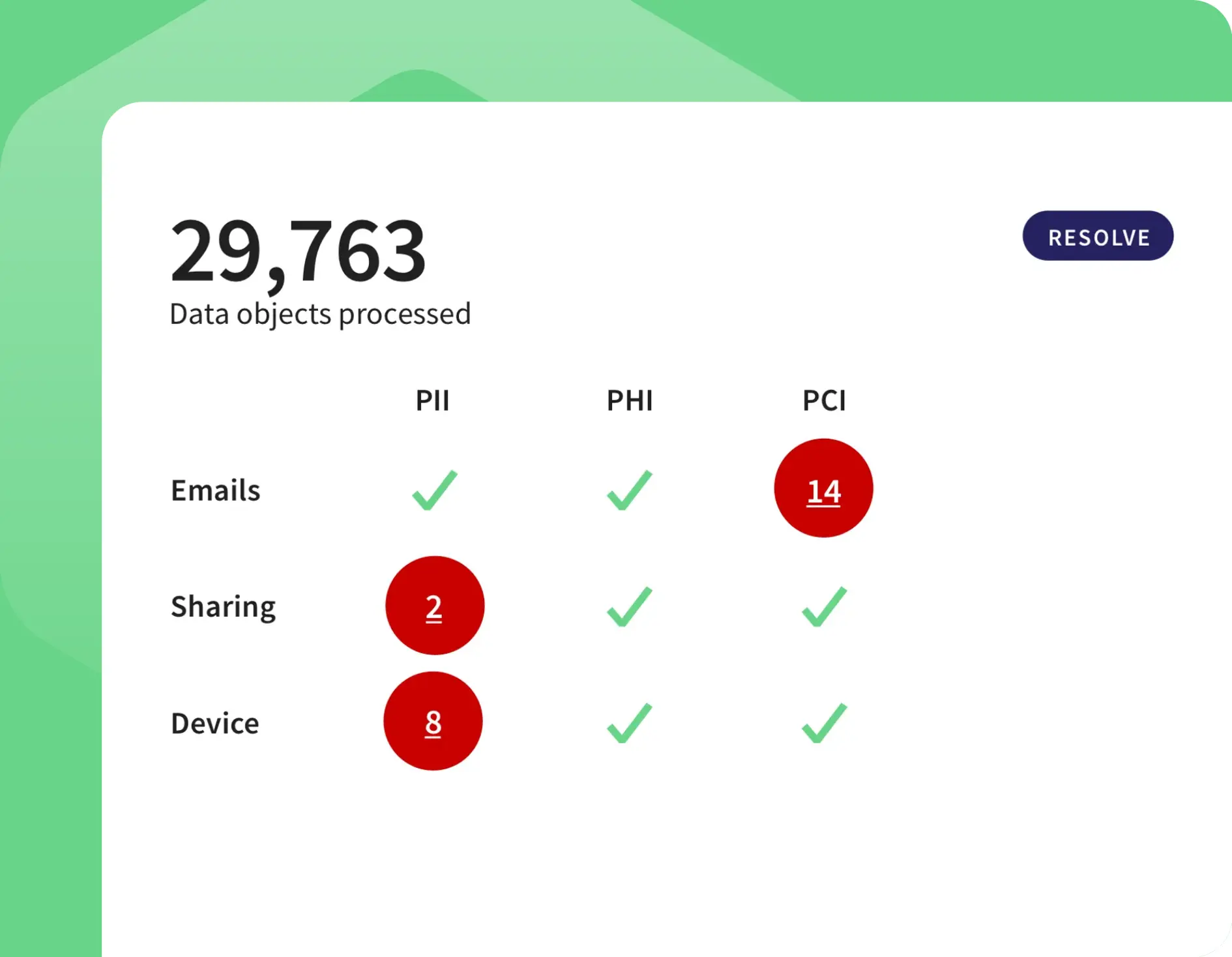
Coro data screen: 29,763 data objects processed, with PII, PHI and PCI findings for emails, sharing and devices.

Protect your IP with data loss prevention across email, users, and devices

Guard against competitors, hackers, and even nation states seeking to steal your valuable IP and data. Coro detects suspicious behavior, threatening software activity, and unauthorized sharing and stops it in its tracks.

Protect your users working in the office and remote

Automatically detect suspicious behavior
Coro uses behavior models to automatically detect when an account has been compromised or when an insider or privileged user is acting like a threat.

Instantly lock down suspicious accounts
Suspend suspicious user accounts or revoke permission to view or share files to protect data and systems.

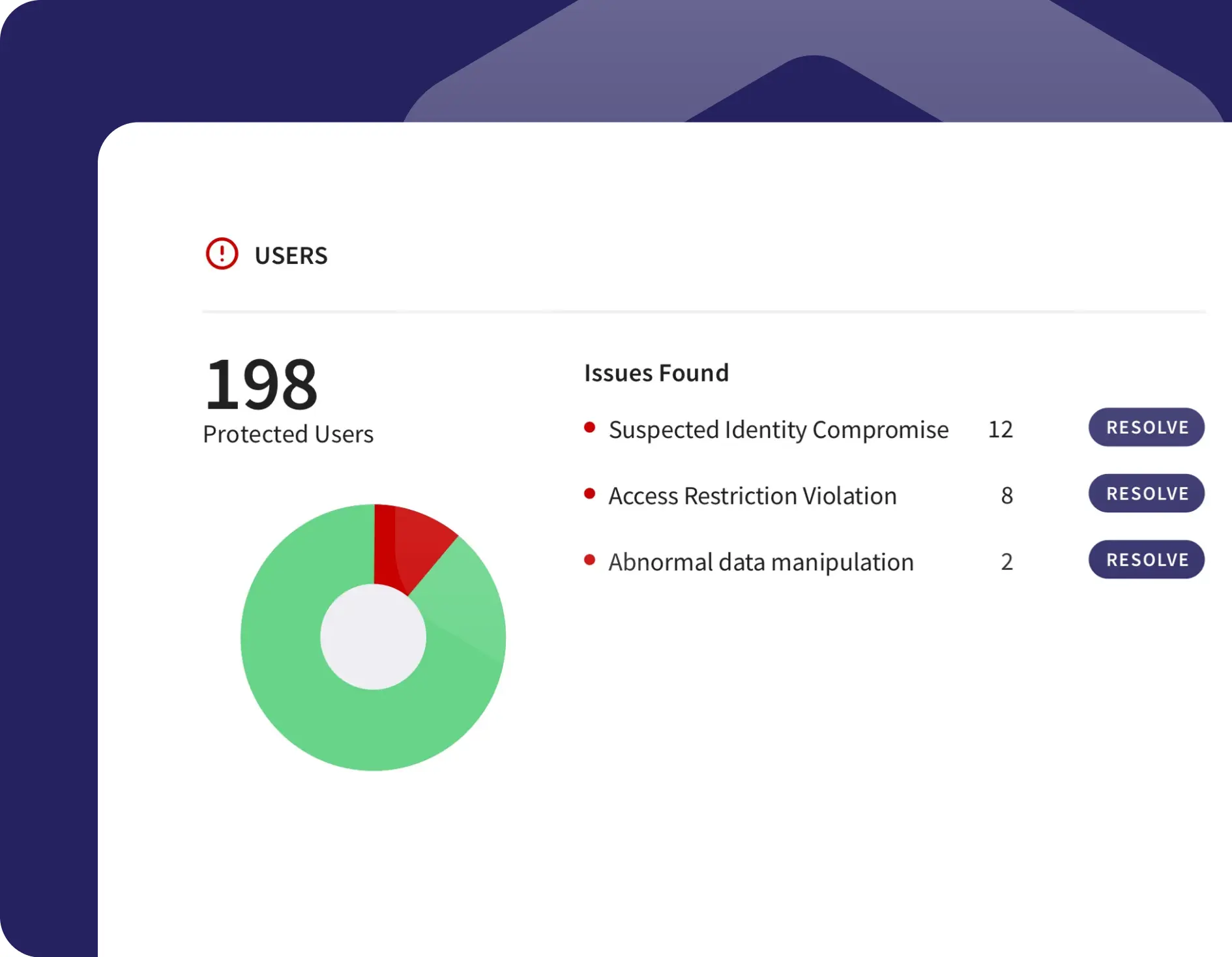
Coro Users panel showing 198 protected users and issues such as suspected identity compromise and access violations.
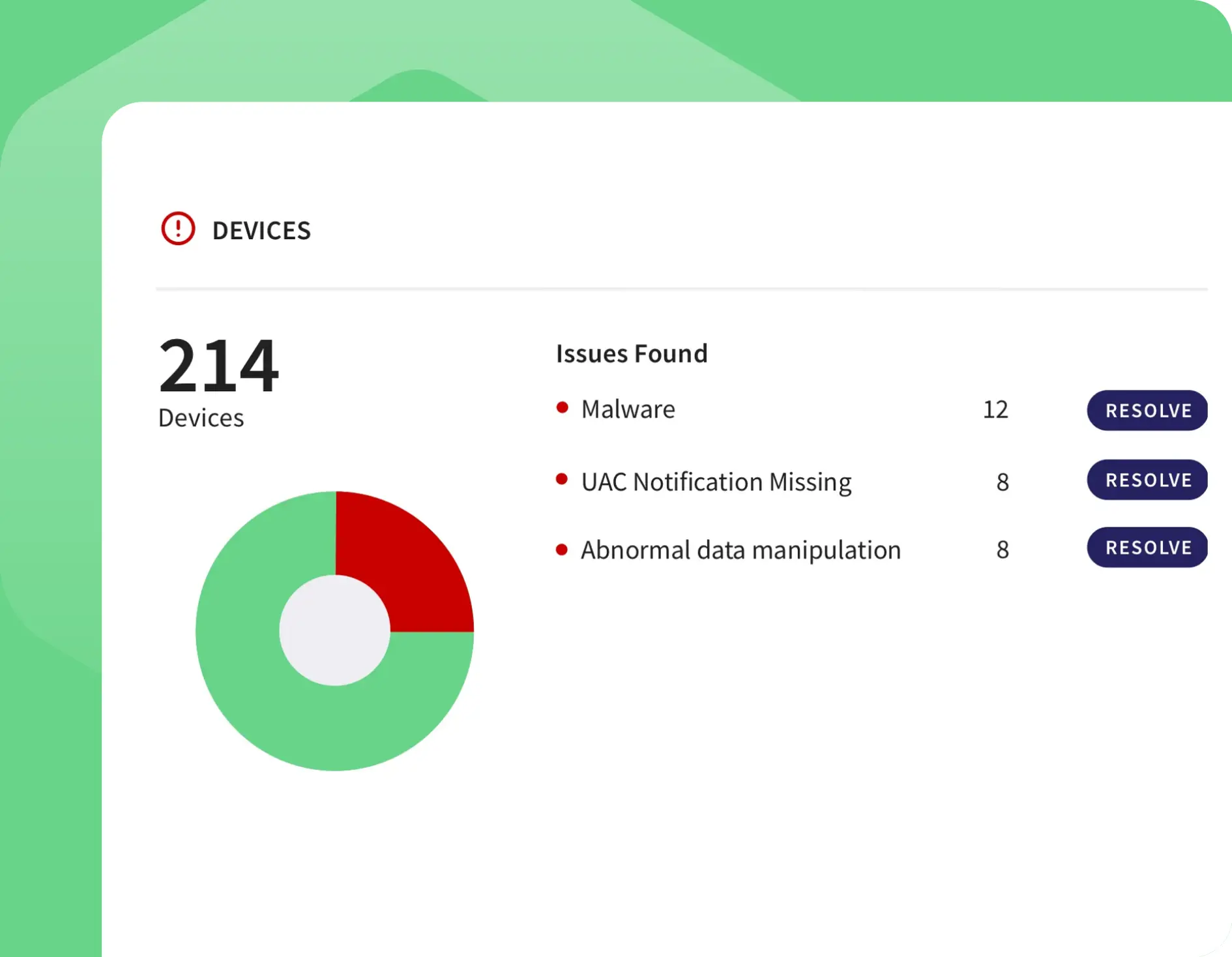
Coro devices panel: 214 devices, with malware, UAC notification and abnormal data issues to resolve.

Protect your devices and apps from malware and ransomware

Identify potential malware and ransomware activity
Use Coro’s built-in templates to quickly apply file policies and search for unique file extensions.

Automatically detect and contain malicious software
Coro’s AI-powered approach automatically distinguishes between human and bot-generated actions. Coro detects potential attacks and automatically remediates them by suspending suspect users and preventing further corruption of files.

Built for lean IT teams

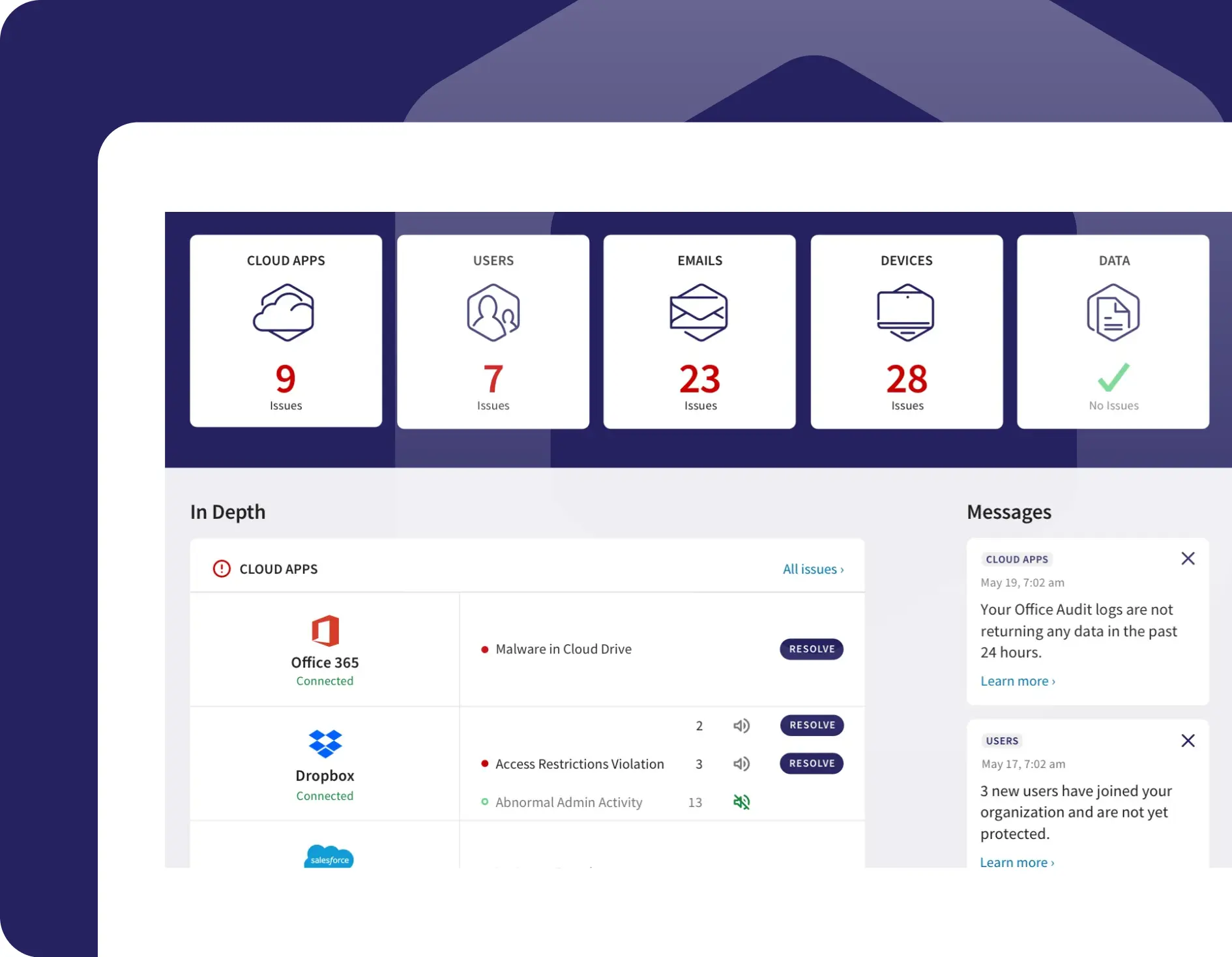
Dashboard with flexible widgets and mobile app helps prioritize risk

  • Let Coro help you prioritize your exposures across your organization

  • Quickly home in on the most vulnerable users

  • Get real-time security posture alerts with details on critical security events

  • View insights and alerts with Coro’s mobile app

Coro dashboard showing issue counts for cloud apps, users, emails and devices, with Office 365 and Dropbox issues.
Check

Don't go at it alone. Let Coro support you.

Connect your business to Coro with a click. Get immediate detection of threats and vulnerabilities for your entire business.

Book a live demo
crosschevron-downcross-circle